
How to Open an XM Trading Account — 2026 Step-by-Step Guide
Table of contents
- Before You Sign Up — What You'll Need
- Choosing the Right XM Entity for Your Country
- Step-by-Step Account Opening
- Identity Verification (KYC) — What Documents to Prepare
- Funding Your Account — Payment Methods Compared
- First Login and Platform Setup
- Common Signup Issues and How to Fix Them
- References
Before You Sign Up — What You'll Need
Opening an XM account takes about 5 minutes from start to finish, but the verification stage moves faster if you have everything ready before you start. Here's the short checklist:
- Government-issued ID — passport, national ID card, or driver's license (color scan or photo, all corners visible)
- Proof of address — utility bill, bank statement, or government letter dated within the last 6 months
- A valid email address — you'll use this as your login
- A phone number — XM may send an SMS verification code during signup
- 5–10 minutes of uninterrupted time — don't start the form, get distracted, and leave it open for an hour
If you're missing any of these, get them in order first. Trying to upload a low-quality phone photo of your driver's license will only slow down KYC approval.
Choosing the Right XM Entity for Your Country
XM operates several regulated entities, and the entity you're routed to depends on your country of residence:
- EU residents → Trading Point of Financial Instruments Ltd (CySEC, Cyprus)
- Australia residents → Trading Point of Financial Instruments Pty Ltd (ASIC)
- Most international clients → XM Global Limited (FSC, Belize)
- Middle East → Trading Point MENA Limited (DFSA, Dubai)
You don't need to choose the entity manually — XM does this automatically based on the country you select in the signup form. Just make sure to select your real country of residence.
Step-by-Step Account Opening
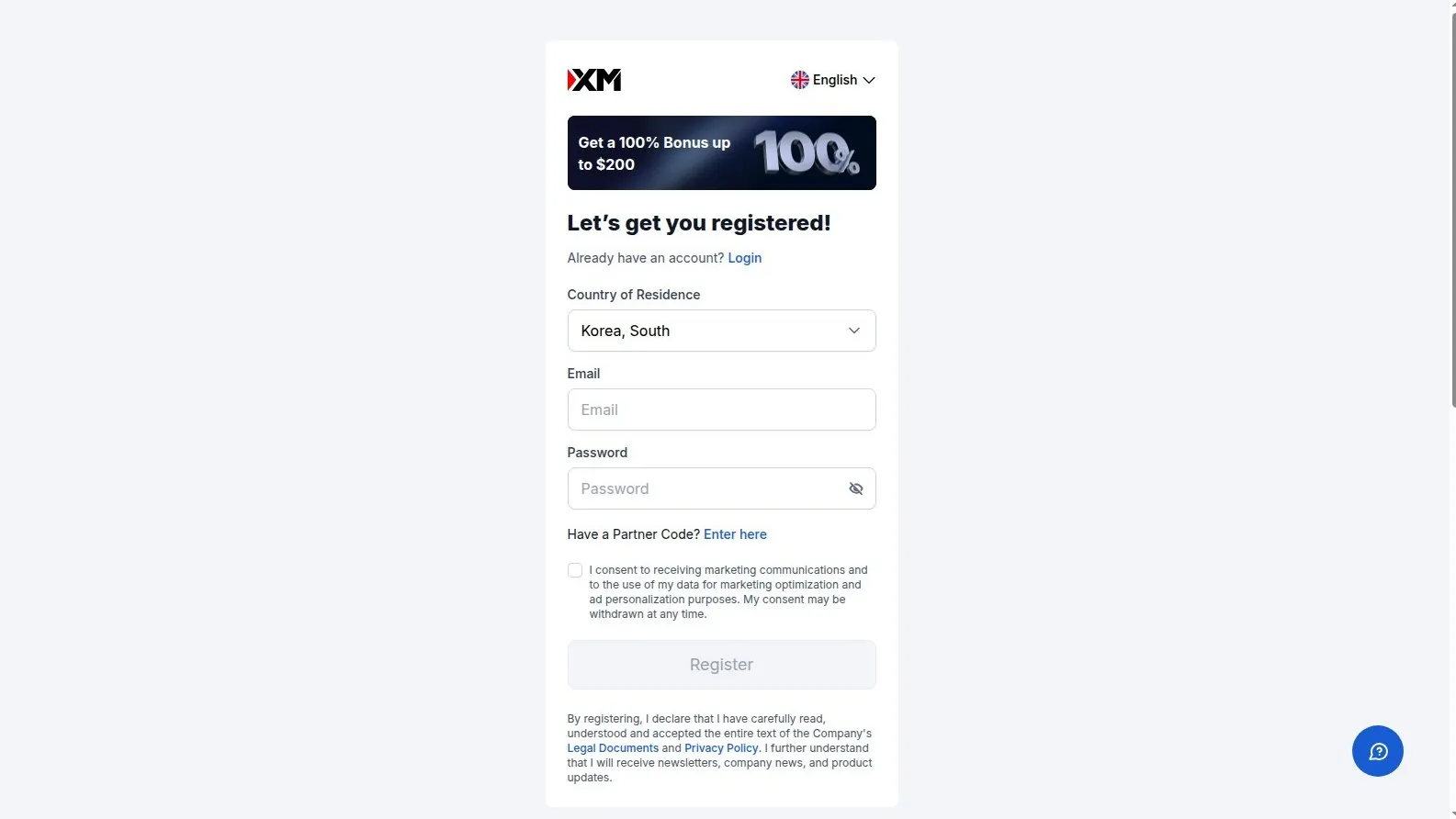
The whole process is intentionally simple. Here are the five steps from clicking the signup link to having a live account.
Identity Verification (KYC) — What Documents to Prepare
After signup, XM asks you to complete KYC verification. This is mandatory and required by every regulated broker — there's no way around it. The good news: it's quick if you prepare in advance.
Required documents:
- Proof of Identity (POI): a clear photo or color scan of your passport, national ID, or driver's license. All four corners must be visible, and details readable.
- Proof of Residence (POR): utility bill (electricity, water, gas, internet), bank statement, or government letter showing your name and address. Must be dated within the last 6 months.
Verification is typically completed within a few hours during business days. If documents are rejected, it's usually because of a blurry photo or an expired bill. Re-upload a fresh, clear copy and you'll be approved.
Funding Your Account — Payment Methods Compared
Once verified, you can fund your account. XM offers a wide range of deposit methods, and most are instant and fee-free:
| Method | Processing Time | Fees | Min Deposit |
|---|---|---|---|
| Visa / Mastercard | Instant | Free | $5 |
| Bank Wire | 1–3 business days | Free (XM covers) | $200 |
| Skrill / Neteller | Instant | Free | $5 |
| Local payment methods | Instant | Free | varies |
Important note for withdrawals: XM follows AML rules, meaning withdrawals must return to the original deposit source. If you deposit by card, you withdraw to that card first (up to the deposit amount), then any remaining profits can go to a bank wire or e-wallet.
First Login and Platform Setup
After funding, you're ready to log in and trade. The login info from the confirmation email goes into MT4 or MT5 like this:
- Login: your 8-digit MT4/MT5 account number
- Password: the master password XM sent you (you can change this later in the Members Area)
- Server: select the exact server name from the dropdown — e.g., "XMGlobal-Real 5"
If the login fails, double-check the server name — server mismatch is the #1 cause of login errors. Once logged in, you'll see your account balance in the bottom-right corner and the market watch panel on the left.
Common Signup Issues and How to Fix Them
| Issue | Cause | Fix |
|---|---|---|
| Documents rejected | Blurry photo or expired bill | Re-upload a clear, recent (within 6 months) document |
| Email verification not arriving | Email caught in spam filter | Check spam folder, whitelist xm.com domain |
| "Country not supported" | XM doesn't offer service in your jurisdiction | Check XM's restricted countries list before signup |
| Cannot select preferred leverage | Entity restriction (e.g., 1:30 max for EU/ESMA) | This is regulatory — not adjustable per account |
| Bonus not activated | Signed up without using the partner link | Contact support, but cannot be retroactively applied |
Almost every problem during XM signup is fixable in under 10 minutes. If you hit something not covered above, XM's live chat is available 24/5 and usually responds within a minute or two.
Ready to start? Open your XM account here. With bonus and rebate eligibility activated automatically through this link.
References
- XM Account Signup (Partner Link)Open an account through this link to auto-activate bonus and rebate eligibility.
- XM Official WebsiteMain XM site with full account types, regulations, and deposit method details.
- XM Members AreaAfter signup, this is where you upload KYC documents and manage your accounts.